
Confidence for the conversations that matter
Most HR tools store records. The Manager Hub sits beside you at the moment you have to do something hard with a person, and tells you how to handle it well, fairly and within the law.

Five ways in, depending on your day
Something's come up
Not sure how serious it is? Start with Situation Triage.
A specific issue to handle
A resignation, a conduct issue, a grievance or a sickness absence. Go straight to the Situation Navigator.
A hard conversation coming up
Find the right words with the Conversation Builder.
A full process to run
Grievance, redundancy or hiring, end to end, with a Guided Workflow.
Nothing urgent
Get better as a manager with the Readiness Diagnostic and a personal development plan.
My Toolkit
Every development plan and tailored script you create is saved, ready to revisit.
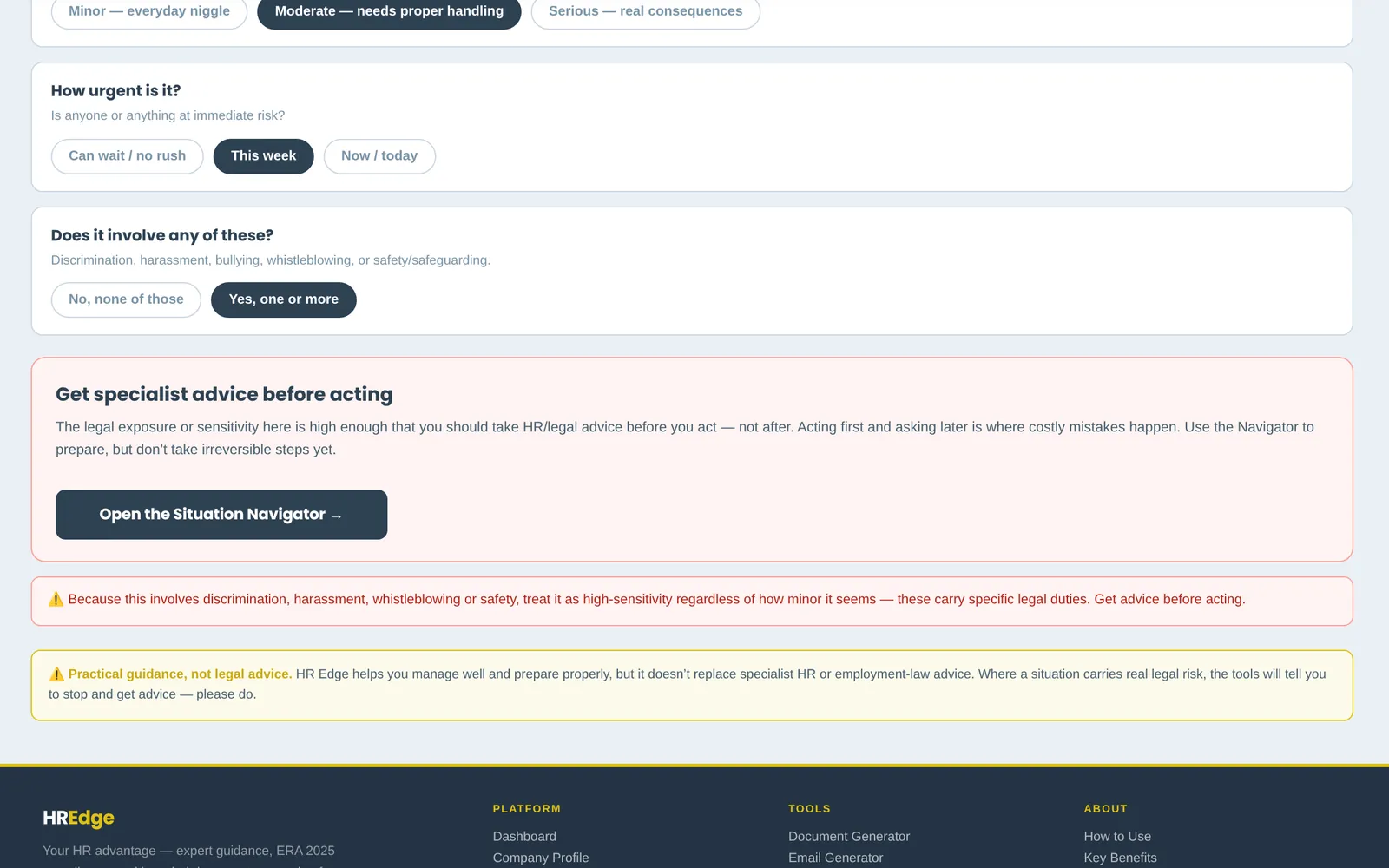
How serious is it? Find out in 30 seconds.
Answer a few quick questions about seriousness, urgency and risk factors. Triage tells you whether to handle it yourself, follow a formal process, or get specialist advice first, and links you to the right next step.
- Flags discrimination, whistleblowing and other high-risk features
- Stops small issues being over-processed, and big ones being under-handled
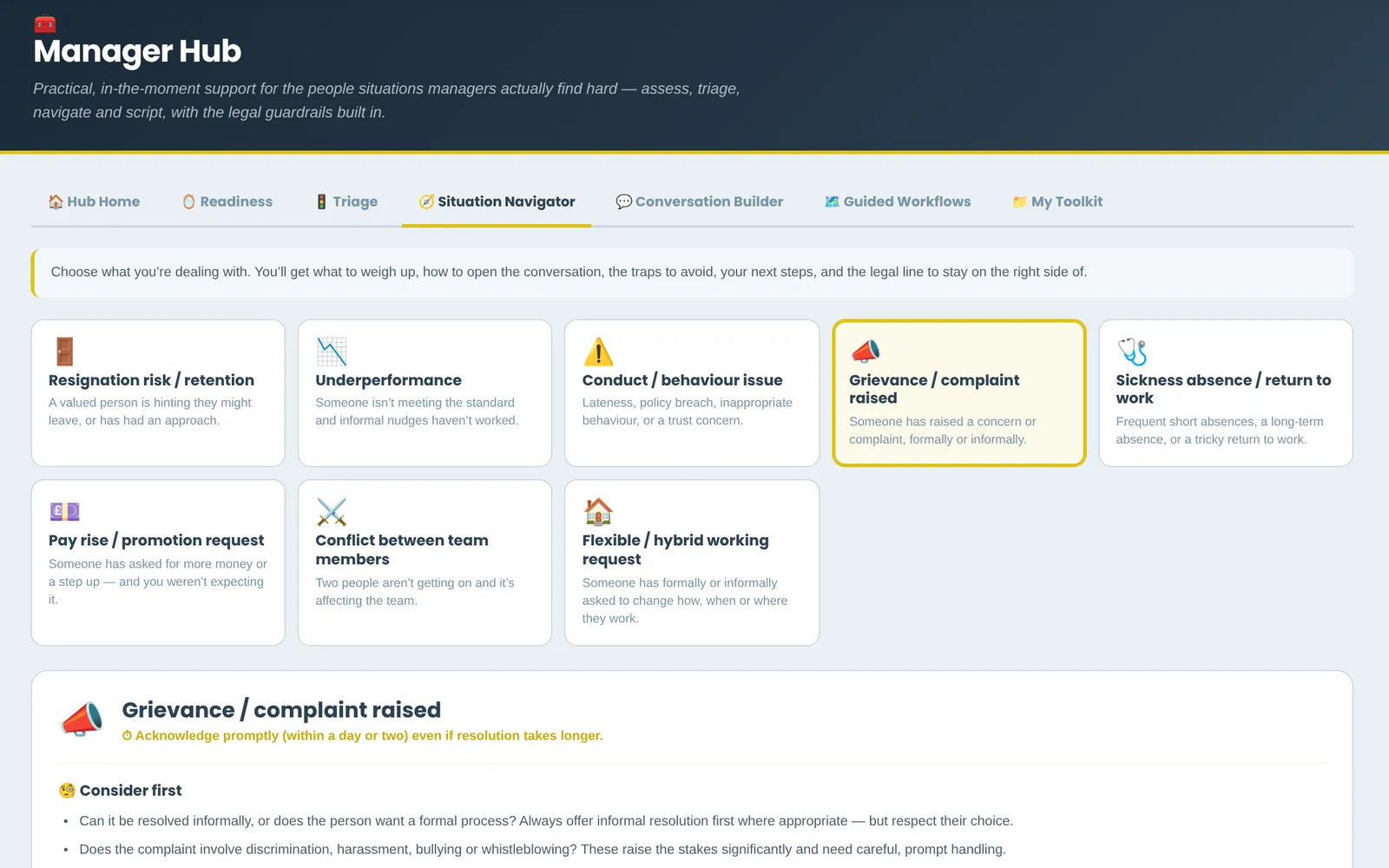
What to consider, what to say, what to avoid
Choose the situation and the Navigator weighs up what matters, how to open the conversation, the traps to avoid, your next steps and the legal ties to watch. It covers seventeen common scenarios, including resignation risk, conduct issues, sickness absence, conflict between team members, flexible working requests, recruiting someone, a new starter, a resignation, possible redundancies, pregnancy, a request for someone’s data and a whistleblowing concern.
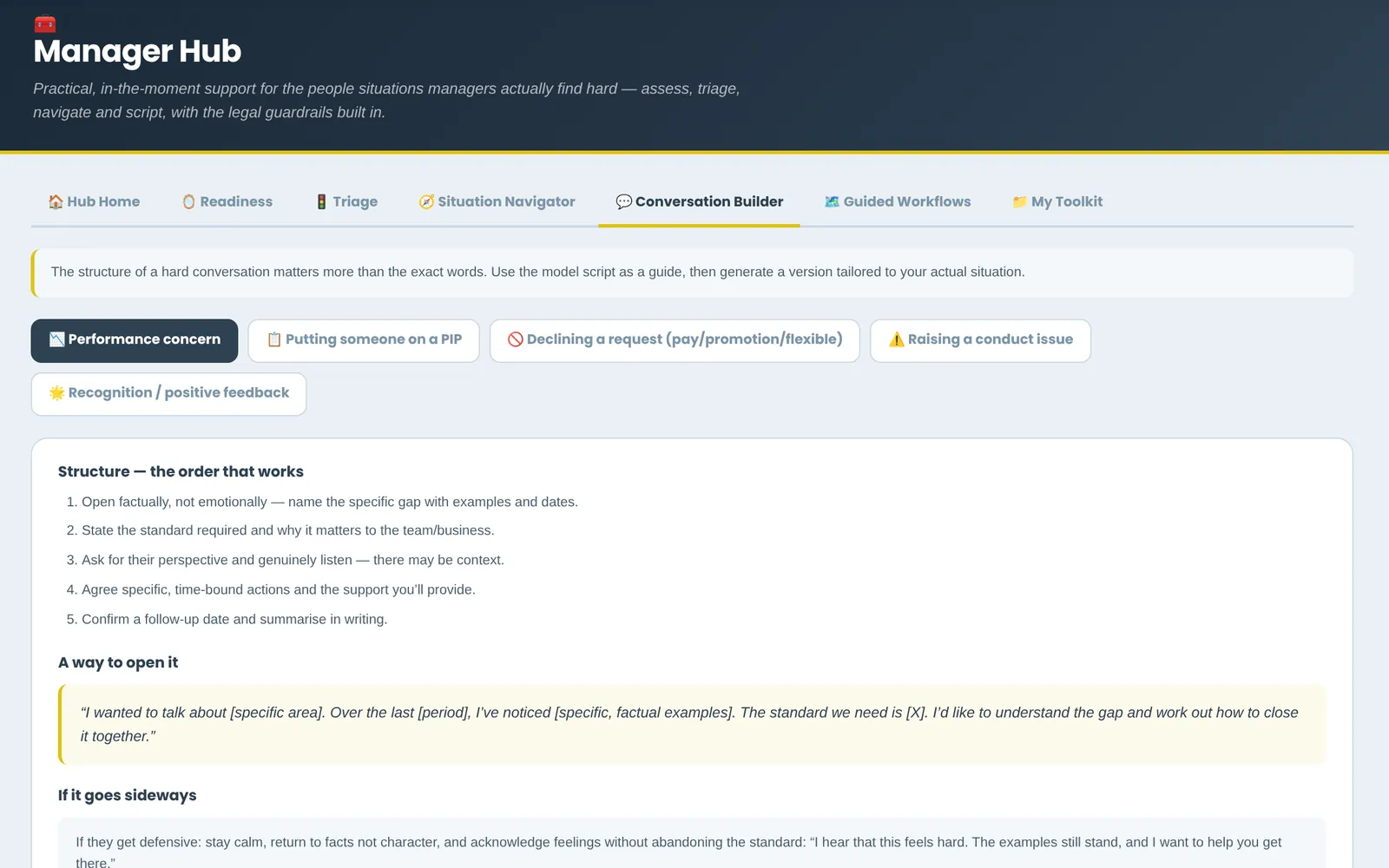
The hardest part is the words
Use a model script for a performance concern, starting a PIP, declining a request or raising a conduct issue. Or describe the situation and the outcome you want, and generate a script tailored to it, with likely responses and how to handle them.
Run the whole process, in the right order
Each workflow breaks a formal process into clear steps, pairs every step with the right letter, form or script from the document library, and tracks your progress so nothing is missed.
| Workflow | Steps |
|---|---|
| Handle a grievance | Acknowledge, investigate, hold the hearing, decide and communicate, handle any appeal |
| Manage a disciplinary | Investigate, consider suspension, invite to a hearing, hold the hearing and decide, confirm the outcome |
| Make a role redundant | Plan and justify, score fairly with evidence, consult each person before deciding, offer alternatives, confirm, pay and hear any appeal |
| Manage long-term sickness | Keep supportive contact, welfare meeting, medical or OH advice, adjustments or phased return, plan next steps |
| Manage probation | Set expectations, review progress, decide, confirm in writing |
| Hire someone | Plan and describe the role, advertise and shortlist, interview and decide, offer and checks, contract and first day |
| Address underperformance | Informal conversation, clear expectations, formal PIP if needed, review and decide |
| Process a leaver | Acknowledge the resignation, plan the exit, hold an exit interview, final pay and records |
| Prevent sexual harassment | Assess the risk, update the policy, train staff, set up reporting routes, act on concerns, review regularly |

Track every hire, starter, leaver and case, from start to finish
Hiring someone, ending a probation and running a disciplinary are three of the riskiest things a small employer does. These tools keep the dates, the decisions and the letters in one place.
From vacancy to first day, fairly
Approval and criteria before you advertise, a language check on the advert, every application and interview scored against the same criteria, a conditional offer, and right-to-work, reference and other checks before anyone starts. Every candidate letter is filled in, and the new starter moves straight into the Probation Tracker.
- No health questions before an offer, adjustments offered at every stage
- Right-to-work check before day one, with follow-up reminders
- Advice prompts before an offer is withdrawn
- Unsuccessful candidates’ details flagged for deletion on time

Starters, leavers and redundancies, handled properly
Every new starter from the offer to the end of the first 90 days: the legal day-one items, a welcome letter, a buddy, check-ins at the end of week one and at 30, 60 and 90 days, and the probation record started for you. New starters from the Hiring Tracker appear automatically.
- Leavers: notice, holiday and final pay with the working shown
- Redundancy: scores with evidence, consultation before any decision
- Statutory redundancy pay calculated, with a written statement
- Warnings for protected employees and the collective threshold

Run every probation the fair way
Reviews are scheduled from your probation policy, objectives and support are recorded, and every letter from the performance module is filled in for you. The tracker shows the date each person reaches six months' service and warns you before it.
- Guard rails that stop a final review until objectives, reviews and support are on record
- Extend, confirm or end a probation with the right letter
- Flags where legal advice is needed before anyone leaves

From the first concern to the appeal
A case manager that follows the Acas Code: triage, plan, suspension, evidence, interviews, report, hearing, outcome and appeal. It records every decision, checks the process as you go, fills in every letter, and shows the points at which to bring in an employment lawyer.
- A process check and a legal risk rating for each case
- A legal briefing pack to send to your lawyer or legal expenses helpline

Become the manager people want to work for
A quick self-check of your management strengths and blind spots, which then generates a personalised development plan. Pair it with Coaching for structured support over time.
Practical guidance, not legal advice. The Manager Hub helps you manage well and prepare properly. Where a situation carries real legal risk, it tells you to take specialist advice before acting.
Related guides
- How to handle a grievance
- Dismissal during probation
- Redundancy in a small business
- Managing long-term sickness
Frequently asked questions
We only have 60 staff. Can we still use people data?
Yes, carefully. Module 11 gives exact definitions for turnover, stability and absence, a small-numbers method so no report points at one person, and the privacy rules for using staff data. The People Data Workbook does the sums each month, hides figures about fewer than five people and sends counts and rates to Board Metrics. It never scores or ranks individuals.
Can we ask for training costs back if someone leaves?
Sometimes, and only fairly. Module 08 includes a training cost repayment agreement built on the 2026 Court of Appeal approach: only for optional external courses, signed before booking, tapering to nothing, never for health and safety or job-required training and never when you end the employment. The Skills & Training Planner works out what could be repaid and checks the minimum wage floor. Take advice before using it.
Our HR is one part-time person. How does HR Edge help?
The HR Request Log gives HR one front door: every request is logged with who owns it and when it is due, anything urgent is flagged the same day, and a cover sheet keeps things moving during holidays. Module 14 adds the HR basics every manager must know, when to call HR or an adviser, an HR service catalogue, simple procedures with cover notes, a development plan for whoever does HR and guidance on HR systems and outside help.
We need to change shifts or bring in a new system. Can HR Edge help?
Yes. The Change Planner checks what the change means in law (a change to terms needs agreement, 20 or more proposed redundancies need collective consultation, a new system that records work needs a data protection impact assessment), works out the consultation dates, keeps a you-asked-we-answered log and records each person’s agreement. Module 10 gives you the consultation guide, the changing terms guide, change letters and a plain-words method for leading change.
How does HR Edge help with succession planning?
The Succession Planner keeps your critical roles, the people who could step into each and how ready they are, emergency cover and when it was last tested, and the knowledge a retiring expert is handing over. Module 07 gives you the talent review method, a fair guide to assessing potential, the succession plan template, acting-up and promotion guidance and a mentoring toolkit. Successors are agreed by people on evidence, never by an automated score, and nothing assumes anyone’s retirement.
Can HR Edge help us plan our people for next year?
Yes. The People Plan Builder turns your business goals into people priorities and actions with owners, quarters and costs, plans headcount by team, works out what each new hire really costs, keeps a people risk register by role and tracks the employment law changes ahead. Module 04 gives you the plan on a page, workforce plan, cost-of-employment worksheet, people budget and quarterly people report to use with it.
How can HR Edge help us keep good people?
The Stay Interview and Retention Tracker keeps a register of key roles and their cover, schedules stay conversations (key people every 6 months, new starters at months 1, 3 and 5), records the manager’s own judgement of the risk of losing someone with a reason (never an automated score), tracks retention actions and works out the honest cost of a leaver. It links to the Module 09 guides on stay interviews, counter-offers and engagement surveys, with privacy and small-numbers protections built in.
How does HR Edge help with reasonable adjustments?
The Adjustments tracker takes each request from the first conversation to a written decision and regular reviews: interim help straight away, a meeting within 10 working days and a decision within 10 more (our recommended timescales), Access to Work prompts and an adjustments passport the employee keeps. A refusal needs a senior review and a note of the advice taken. It links to the Module 12 guides on reasonable adjustments, neurodiversity and menopause. It is guidance, not legal advice.
Can HR Edge check we pay the minimum wage correctly?
Yes. The Minimum Wage Checker works pay period by pay period: the right rate for each worker's age on the first day of the period, premium pay and tips left out, deductions for your benefit taken off, and salaried hours counted the way the regulations require. It shows any shortfall and the arrears, and warns you before April upratings and birthdays. The Pay Review Planner then puts statutory uplifts first in your pay review. Both link to the Module 03 guides and letters. It is guidance, not legal advice: check the figures with your payroll provider.
Does HR Edge help with redundancy?
Yes. The Redundancy case tracker takes you from the business case to the appeal for fewer than 20 roles: a fair pool, weighted selection scores that need evidence, individual consultation before any decision, suitable alternative jobs and trial periods, and statutory redundancy pay with the working shown. It warns you about protected employees and the 20-person threshold for collective consultation, and every letter comes from the Module 13 documents. It is guidance, not legal advice: take advice where it warns you.
Does the Manager Hub help with recruitment?
Yes. The Hiring Tracker runs each vacancy from approval to the first day: criteria set before you advertise, every candidate scored the same way, adjustments recorded, a conditional offer in writing, and right-to-work, reference and other checks before anyone starts. It fills in every candidate letter from the recruitment module and hands the new starter to the Probation Tracker.
Which situations does the Manager Hub cover?
Situation Triage and the Situation Navigator cover common people issues such as resignations, conduct, performance concerns, grievances, sickness absence, conflict between team members, pay or promotion requests and flexible working requests. Guided Workflows cover handling a grievance, managing a disciplinary, making a role redundant, managing long-term sickness, managing probation, hiring someone, addressing underperformance, processing a leaver and taking reasonable steps to prevent sexual harassment.
Will it tell me when I need a lawyer?
Yes. Situation Triage grades how serious and urgent a situation is and whether it involves risk factors such as discrimination, whistleblowing or a protected characteristic. When a situation needs specialist advice before you act, it says so.
How does the Probation Tracker help before January 2027?
From 1 January 2027 most employees can claim unfair dismissal after six months' service. The tracker shows the date each person reaches that point, warns you before it, and stops you planning a final review until objectives, reviews and support are on record.
Does the case manager replace an employment lawyer?
No. It runs the process with you and keeps the record, and it tells you the points at which to take legal advice, with a briefing pack to send. HR Edge provides guidance, not legal advice.
Is the Manager Hub only for line managers?
No. It's built for anyone who manages people: founders, directors, team leaders and HR generalists who support managers.
Big-company HR, without the big-company HR department
Start on the free plan in minutes. Upgrade to Pro or Premium when you need the full library and tools. No per-employee fees.